 FAM
FAMTicked in the shop, gone from every phone
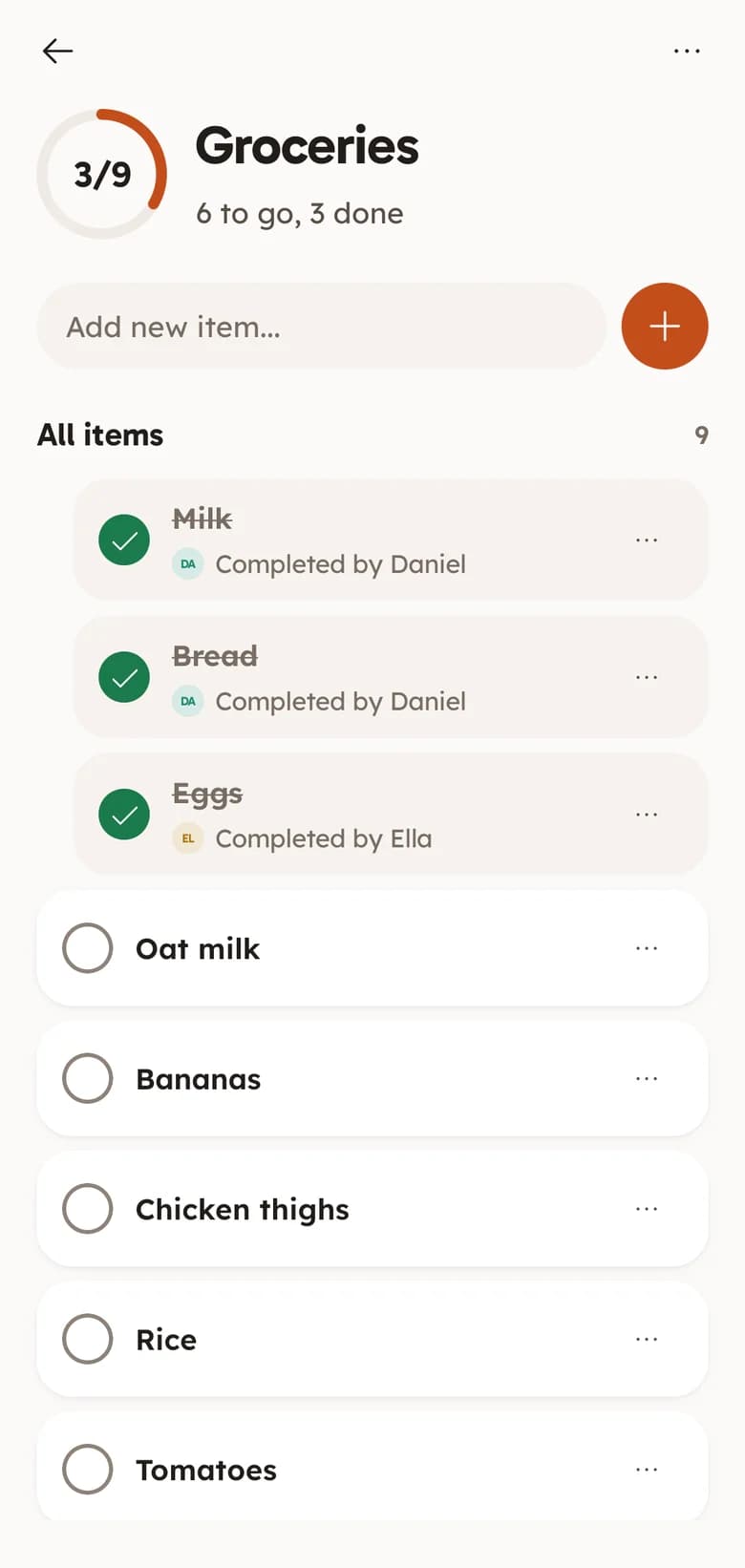
Whoever is in the shop ticks things off and everyone else sees it straight away, with who got what. Nobody buys the second loaf.
Real-time check-off. Shows who ticked each item. Progress ring as you go.
Add it once and it is on everyone's phone. Tick it in the shop and it is gone from theirs.
Free on Android and in any browser. No ads.
A photo of the fridge note, three messages saying “we're out of milk” and somebody buying eggs twice. A shared list fixes all of it, as long as everyone is on the same one.
Everything below is in FAM today, free, for everyone in your family.
Whoever is in the shop ticks things off and everyone else sees it straight away, with who got what. Nobody buys the second loaf.
Real-time check-off. Shows who ticked each item. Progress ring as you go.
Type it, or hold the mic and say “add oat milk”. Suggestions appear as you type, from what your family usually buys.
Voice adding. Suggestions as you type. Notes on any item.
Pin Groceries to your home screen on Android and tick items off without opening the app.
Home screen widget. Tick from the widget. Any list, any size.
Tick the last thing and the rest of the family gets a note that the shop is done, so nobody sets off for a second trip.
A note when a list is finished. One note, not a flood.
Plan the week’s dinners in FAM, then turn their ingredients into a shopping list in one go.
Weekly meal plan. Recipe box. Builds the grocery list for you.
The same lists work for packing, chores, birthday parties and the DIY job that never ends. Start from a ready-made list or name your own.
Unlimited lists. Ready-made starters. Shopping, chores, wishlists.
One tap makes a Groceries list with the staples already on it: milk, bread, eggs and the rest. Take off what you do not need.
Send your family an invite link. They install FAM, or open it in a browser, and the same list is on their phone.
Whoever is out does the shop and ticks as they go. Everyone at home sees what is left.
Something else? Email support@keepitclose.app
Yes. FAM is free with every feature switched on, for everyone in your family. There is no trial, no card and no ads.
Yes, in a browser. FAM is on Google Play today and the iPhone app is in the works. Until then, anyone on an iPhone or a computer can open the invite link, sign in at keepitclose.app and use the same list.
As many as you like: one for the big weekly shop, one for the chemist, one for the camping trip. Each list shows how much is left on it.
Only the people you invite to your Space. FAM is invite-only, and we do not sell data or show ads.
Share an invite link from the app. Whoever opens it joins your Space and sees your lists, your calendar and your chat. Each link works once, for seven days.

FAM is the family organiser behind this list: a shared calendar, chat and memories too. See everything in FAM.
Get FAM on Google PlayiOS coming soon. Works in any browser today.